GroqChat
Overview
GroqChat is a powerful integration in AnswerAgentAI that leverages Groq's Lightning-fast Processing Unit (LPU) Inference Engine. This feature allows you to access state-of-the-art language models like Llama, Mixtral, and Gemma, including Groq's own fine-tuned versions, with unprecedented speed and efficiency.
Key Benefits
- Blazing Fast Inference: Experience lightning-quick responses from large language models.
- Access to Advanced Models: Utilize cutting-edge models like Llama, Mixtral, and Gemma.
- Customization Options: Fine-tune your interactions with adjustable parameters.
How to Use
-
Set up Groq API Credentials:
- Obtain a Groq API key from the Groq platform.
- Add your Groq API credentials to AnswerAgentAI.
-
Configure GroqChat Node:
- Drag and drop the GroqChat node into your workflow.
- Connect it to your desired input and output nodes.
-
Select Model and Parameters:
- Choose a model from the available options (e.g., llama3-70b-8192).
- Adjust the temperature setting if needed (default is 0.9).
- Optionally, connect a cache for improved performance.
-
Run Your Workflow:
- Execute your workflow to start interacting with the GroqChat model.
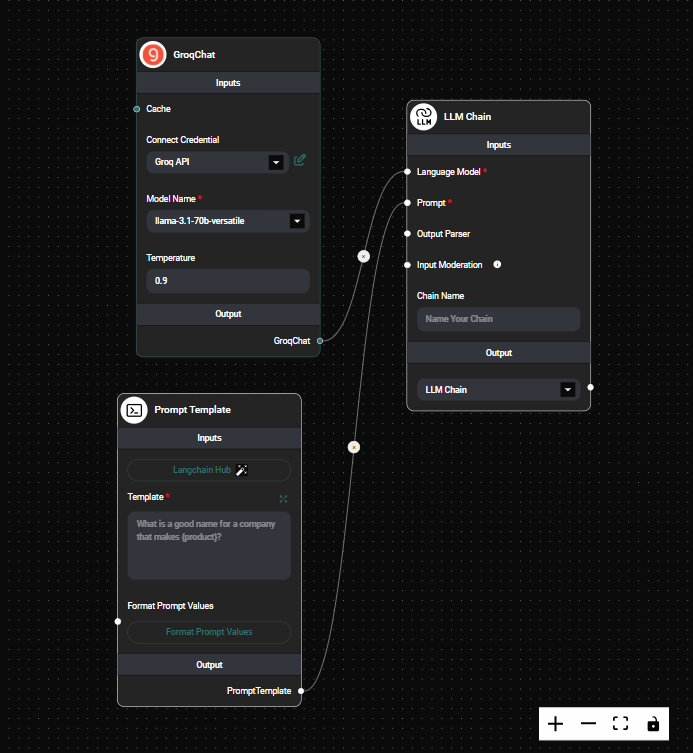
GroqChat Node Configuration & Drop UI
Tips and Best Practices
-
Model Selection: Choose the appropriate model based on your specific use case. Larger models like llama3-70b-8192 offer more capabilities but may have longer processing times.
-
Temperature Tuning: Adjust the temperature to control the randomness of the output. Lower values (e.g., 0.2) produce more focused responses, while higher values (e.g., 0.8) generate more creative outputs.
-
Caching: Implement caching to improve response times for repeated queries and reduce API usage.
-
API Key Security: Always keep your Groq API key secure and never share it publicly.
Troubleshooting
-
Slow Responses:
- Ensure you have a stable internet connection.
- Consider using a smaller model or implementing caching.
-
API Key Issues:
- Verify that your Groq API key is correctly entered in the AnswerAgentAI credentials.
- Check if your API key has the necessary permissions.
-
Model Unavailability:
- If a specific model is unavailable, try selecting an alternative model from the list.
- Check Groq's status page for any ongoing issues or maintenance.
GroqChat in AnswerAgentAI opens up new possibilities for blazing-fast language model interactions. By leveraging Groq's LPU technology, you can now process complex language tasks at unprecedented speeds, making your AI workflows more efficient and responsive than ever before.